
7 Challenges Facing Mobile Field Service ? And Overcoming them with FSM Solutions

Managing a mobile workforce comes with its set of challenges. There are multiple coordination levels, administrative hurdles when distributing tasks amongst your employees, the need to meet your customers? expectations, whilst still operating profitably. Your goal is to rake in more revenue, while striking a balance between the number of employees and the quality of the service being rendered. Under utilisation of the company resources may be misinterpreted to mean that you need more employees- which will affect your bottom line. Repeat visits with older jobs affect the response time for new client appointments. Clients get frustrated when their needs are not met on time. Remember that, for your client, their priority is getting their issue sorted- be it that pipe leak, electrical fault, damaged gas valve, or window installation completed on time. Administrative challenges on your end will simply come off as excuses, costing your brand dearly. The different fields share similar challenges- from utility firms, pest control, installation and repair services such as with plumbers and electricians, those running residential and commercial window cleaning companies, to property managers in charge of different buildings. Here are some of the obstacles faced:

1. Coordinating your team

Running things from the office can get hectic when your technicians are out on ground, and clients are at different locations. From appointments being delayed because the workers met traffic on their way, those calling in sick and requiring you to find replacements on short notice, clients who cancel appointments without notice- they all present a logistical nightmare. There is also the need to have a skill-based task distribution in place. Here, the focus is on getting the right technician for the job, not someone who has simply “dealt with it before as they helped their colleagues on a similar job“. With your firm having different personnel, you want to ensure that you spend the most appropriate technician to your client. This also aids the employees themselves, by increasing their morale as they will be dealing with tasks that they are particularly adept at, score you a high first-time fix rate, and avoid having to do follow up visits to resolve issues that were not properly addressed the first time round. 

Capterra undertook a field service software survey, which showed that 82% of organisations adopting FSM solutions saw an increased rate of first-time fixes, and a 90% rise in actual conversations from quotes.
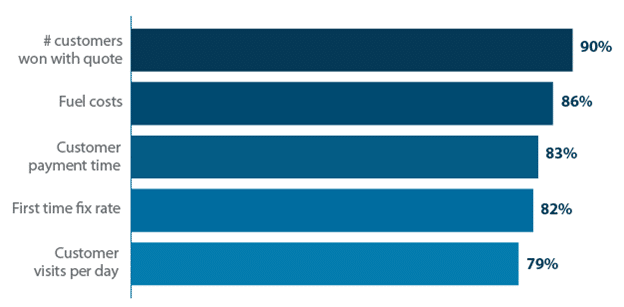
Capterra

How field service job management software impacts businesses. Source: Capterra

 Follow-ups tend to cost extra with the additional dispatch, and take away your fiend agents from the work that had been scheduled to be handled. Resolving these logistical issues with traditional approaches can be problematic, especially with all the paperwork involved. In fact, let’s delve into that.

2. Mounds of paperwork

Having loads of data streaming in from your field workforce can put one on edge. Organising the documents, creating the spreadsheets and typing away at calculators, sorting the files in cabinets and the stress that comes when a single file appears lost in the heaps of sheets – it creates a bottleneck for your operations.  Manually handling the data at the central office also compromises on the accuracy of the process due to human error, from syntax issues when transferring information, incorrect inputs, to duplicate errors- which is expected to occur with increased frequency due to the tiring nature of the process. Actually, 46% of the respondents surveyed by the Service Council said that paperwork and admin work was the worst part of their day.

The field worker is also affected by the paperwork. From having to come to the office each morning to collect the documents needed for the day, walking with the bulky files from one site to another, perusing through lots of sheets whenever they want mire information about a particular customer or the job description- and the frustration that comes when some documents have been forgotten back at the office- it hampers productivity. Running out of copies of paper will also be unavoidable when your staff are away from the office- and more time will be spent coming back to restock. There are also additional issues like the forms getting soiled or torn, and even the wind blowing them away as your technicians are out in the field.  Dealing with the contracts, collecting signatures for each job that is handled, jotting down notes concerning the particular tasks that they are taking care of- it increases the workload. In fact, this often results in errors in data entry, and jobs being poorly documented.

Fortunately, this doesn’t have to be the case for your firm. Technological advancements have seen solutions being developed to minimise the paperwork involved. These mobile service management software allow the field worker to access all the details of the job via handy apps on their smartphones and tablets- as is the case with FieldElite. Instead of walking around with the documents and files, the information is stored via cloud, and is accessible in real-time. The job documentation- from photos, notes to the customer?s e-signature are all collected through the app, and the information is securely stored and immediately available to the personnel back at the head office. 

Service analytics- where you get to observe product demand, performance of your workforce and analyse your customer base growth through the dashboard reporting modules that come with the FMS software is a key tool for decision makers of the company. You get to optimise your performance without having to resort to adding more work hours, or pushing your employees into overtime. Field service analytics has been shown to increase profitability for leading companies by 18%, going by the ?Get Smart: Business Intelligence and Analytics for Service Organizations? study done by Aberdeen Group.

3. Scheduling conflicts

First, there are multiple jobs that need to be attended to- and disappointing your clients will lead to backlash. Secondly, you have a large team of workers- and you want to optimise on their productivity at an individual level. From an administrative perspective, you are also required to provide proper work structures that incorporate your employees? safety during the jobs being handled- and not to run them like mules, overworking them in a bid to hit your targets. Thirdly, the workers have different individual hours of operations- or they work in shifts. Running all this from a central point, allocating the jobs as needed and managing the different schedules, can be a tall order without the right field service scheduling software.

When your customers book an appointment, they expect that your company will deliver on its mandate, providing the services that they are paying you for as required. On the other hand, as the company, you are relying on your employees to meet those expectations. This means that you should have structures in place to ensure that your field workers stick to their assigned schedules. For this you will need to know their location in real-time, track their performance, and check on their adherence to the set schedules. Working with field service job management software allows you to handle the logistics of every task from one dashboard. By tracking your technicians while they are out in the field, you will be able to allocate orders faster, monitor the incoming customer requests, and manage the task distribution more efficiently. When you have an FSM that allows your workers to coordinate with the head office via mobile app, there will be an increased rate of job completion, and a reduction in overtime. Both your clients and employees get to be happy at the end of the day.

4. Lonely workers

Working in the office has its perks. You are surrounded by your colleagues, and can easily get the attention of anyone in management if needed. However, while out in the field, the workers can feel disconnected from the company structure, left to their devices while still bearing the responsibility of presenting the company in positive light- as they also double up as your brand ambassadors. The loneliness can get to them, with a report by the Service Council showing that isolation was the worst part of the work day for 21% of technicians. The chat feature that comes with the mobile service management software apps is one of the reasons behind their popularity, keeping the employees connected to the rest of the manager at the central office, and even other field employees- which makes them feel as part of one large family.

Safety is also a concern, especially for cases where your field staff will be working in hazardous situations – like conducting repairs on top of radio towers, dealing with gas equipment in concealed spaces. The central office needs to remain in constant communication with the workers, and have the appropriate structures in place to handle emergencies. You don’t want to lose employees because they don’t feel that their safety is a priority to you. A skilled technician is an asset that should be protected- and certainly you wouldn’t want to incur extra funds to hire and train personnel- which will end up being an additional strain to your budget over time. Field service job management software with features that allow your employees to check-in remotely via app will be handy in notifying the head office of their arrival at the job site, and in case of any incident, the field manager can quickly see the employees? last location, and dispatch help to them. 

5. Difficulty in assessing performance metrics

When you have a situation where timesheets are only handed in after the workday- and in some cases at the end of the week, it becomes difficult to assess the level of productivity of your field workers. Are you getting value for your money with the wages that are being paid out? Are there lots of lost work hours due to logistical hitches- or cases where the field worker delay the tasks, or take out sections of their day to attend to matters of personal interest- and still bill you for it? All this translates to poor customer service, with issues ranging from cancelled and rescheduled appointments, unmet targets, disagreements based on the scope of work being handled, to client dissatisfaction for not having their issues addressed in a timely manner- which becomes a hit on your brand.

FSM comes in to enable the field service manager to always be in the loop during the entire process- knowing exactly how long the workers are spending on each particular task, the jobs that are pending, cancelled or rescheduled, in order to constantly review and optimise the planning of the firm?s activities. With software like FieldElite, you even get a birds-eye view, as the work areas are mapped out, that way you will be in a position to direct your field workers on aspects like the best routes to take to avoid traffic gridlocks.

6. The break factor

How do you plan for breaks? Jobs are different, and there will be unexpected issues cropping up regularly. However, the field worker is still entitled to breaks during the working day- such as the all-important lunchtime. The problem arises when there is unextended time on some job sites, and cases of unscheduled breaks being taken. These have a ripple effect, as they will cause delays on other projects that are on queue, and you can also expect customer complaints to be coming in hot and hard. From a management point of view, you want to have the ability to respond to the issues as they arise, and reassign the jobs accordingly. Mobile service management software gives you this power.

7. Customer relationship management

Customers want to be part of the process, staying in the loop with the service appointments that have been scheduled- and understandably so. From the booking process, to following up on the progress of the job- it all factors in. In case there are issues that crop up- like service vehicles being delayed, situations where extra parts need to be ordered, or the session cancelled and scheduled on a different day- being fully transparent with your customers will be a great boost to your brand. Gaining new clients and retaining the current ones requires the firm to maintain a quality customer service.

Negative feedback because of your customers? feeling neglected will be a setback for your business. Integrating the customer relationship management into the field service will go a long way in enhancing their experience. Here, software solutions like FieldElite have also got you covered with a customer self-serve portal, accessible online through their browsers. This has the welcome benefit of reducing the number of calls as they conduct follow-ups, since they will be in a position to track the project right from the comfort of their homes and office desks, thus increasing customer satisfaction.

Check our similar posts

How COBIT helps you achieve SOX Compliance

First released way back in 1996, COBIT has already been around for quite a while. One reason why it never took off was because companies were never compelled to use it ? until now. Today, many CEOs and CIOs are finding it to be a vital tool for achieving SOX compliance in IT.

Thanks to SOX, COBIT (Control Objectives for Information and related Technology) is now one of the most widely accepted source of guidance among companies who have IT integrated with their accounting/financial systems. It has also gained general acceptability with third parties and regulators. But how did this happen?

Role of control frameworks in SOX compliance

You see, the Sarbanes-Oxley Act, despite having clearly manifested the urgency of establishing effective internal controls, does not provide a road map for you to follow nor does it specify a yardstick to help you determine whether an acceptable mileage in the right direction has already been achieved.

In other words, if you were a CIO and you wanted to find guidance on what steps you had to take to achieve compliance, you wouldn’t be able to find the answers in the legislation itself.

That can be a big problem. Two of your main SOX compliance obligations as a CEO or CIO is to assume responsibility in establishing internal controls over financial reporting and to certify their effectiveness. After that, the external auditors are supposed to attest to your assertions. Obviously, there has to be a well-defined basis before you can make such assertions and auditors can attest to anything.

In the language of auditors, this ?well-defined basis? is known as a control framework. Simply put, once you certify the presence of adequate internal controls in your organisation, the external auditor will ask, ?What control framework did you use??

Knowing what control framework you employed will help external auditors determine how to proceed with their evaluations and tests. For your part, a control framework can serve as a guide to help you work towards specific objectives for achieving compliance. Both of you can use it as a common reference point before drawing any conclusions regarding your controls.

But there are many control frameworks out there. What should you use?

How SOX, COSO, and COBIT fit together

Fortunately, despite SOX?s silence regarding control frameworks, you aren’t left entirely to your own devices. You could actually take a hint from the SEC and PCAOB, two of the lead organisations responsible for implementing SOX. SEC and PCAOB point to the adoption of any widely accepted control framework.

In this regard, they both highly endorse COSO, a well-established internal control framework formulated by the Committee of Sponsoring Organisations of the Treadway Commission (COSO). Now, I must tell you, if you’re looking specifically for instructions pertaining to IT controls, you won’t find those in COSO either.

Although COSO is the most established control framework for enterprise governance and risk management you’ll ever find (and in fact, it’s what we recommend for your general accounting processes), it lacks many IT-related details. What is therefore needed for your IT processes is a framework that, in addition to being highly aligned with COSO, also provides more detailed considerations for IT.

This is where COBIT fits the bill.

How COBIT can contribute to your regulatory compliance endeavors

COBIT builds upon and adheres with COSO while providing a finer grain of detail focused on IT. You can even find a mapping between COBIT IT processes and COSO components within the COBIT document itself.

Designed with regulatory compliance in mind, COBIT lays down a clear path for developing policies and good practice for IT control, thus enabling you to bridge the gap between control requirements, technical issues, and business risks.

Some of the components you’ll find in COBIT include:

IT control objectives

These are statements defining specific desired results that, as a whole, characterise a well-managed IT process. They come in two forms for each COBIT-defined IT process: a high-level control objective and a number of detailed control objectives. These objectives will enable you to have a sense of direction by telling you exactly what you need to aim for.

Maturity models

These are used as benchmarks that give you a relative measurement stating where your level of management or control over an IT process or high-level control objective stands. It serves as a basis for setting as-is and to-be positions and enables support for gap analysis, which determines what needs to be done to achieve a chosen level. Basically, if a control objective points you to a direction, then its corresponding maturity model tells you how far in that direction you’ve gone.

RACI charts

These charts tell you who (e.g. CEO, CFO, Head of Operations, Head of IT Administration) should be Responsible, Accountable, Consulted, and Informed for each activity.

Goals and Metrics

These are sets of goals along with the corresponding metrics that allow you to measure against those goals. Goals and metrics are defined in three levels: IT goals and metrics, which define what business expects from IT; process goals and metrics, which define what the IT process should deliver to support It’s objectives; and activity goals and metrics, which measure how well the process is performing.

In addition to those, you’ll also find mappings of each process to the information criteria involved, IT resources that need to be leveraged, and the governance focus areas that are affected.

Everything is presented in a logical and manageable structure, so that you can easily draw connections between IT processes and business goals, which will in turn help you decide what appropriate governance and control is needed. Ultimately, COBIT can equip you with the right tools to maintain a cost-benefit balance as you work towards achieving SOX compliance.

Implementing Matrix Management

Matrix management is a culture change. More than the hierarchical structures, lines of responsibilities, modes of communication and channels of decision-making, it is a concept that needs to be planned ahead and managed appropriately over time.

Implementing matrix management to any organization can be confusing. It is essential to ensure that it fits right to your business strategies, skills and competencies. With this, realizing matrix management should not be taken lightly. Careful stages should be considered, instead.

Here are the steps to proper implementation of matrix management:

Consider Your Business Context

You need to evaluate your organisation to analyse what are your development needs with regards to skills, products, services and market environment. This will help you decide on what type of matrix structure you will apply in your organisation. Consider the following questions in building up your context:

  • What is our strategy?
  • Where are the demands in our business?
  • What are the structures that our competitors currently employ?
  • What are the talents that my people possess?
  • What are other business organizations doing?

Set Your Implementation Scope

Next, you need to define the parameter and set the scope of your implementation. What area in your business do you think matrix management will successfully work? There are several things that you need to consider in setting your scope. You have to make sure that it works well with your overall business strategies, that it can be excellently communicated and easily understood. Also, you must ensure that you acquire the necessary talents and skills in the business to deliver the new system of responsibilities.

Implement the New Structure

When you have already decided what structure type you will implement, you are ready to give it a go. You will need to establish new communication channels so you can monitor the progress and receive feedback effectively.

Here?s how to apply the matrix structure:

  • Highlight your development needs
  • Define roles based on outputs and not inputs
  • Line up procedures and systems to support the structure and the behaviour that comes with it.
  • Invest in training and development
  • Support the key people in the structure by coaching them to better adapt in changes
  • Communicate regularly
  • Monitor progress and make necessary adjustments

Review the Matrix Structure, Roles and Responsibilities

Organisations that successfully implement matrix management adapt to the changes in their environment. With this, they do regular evaluations to highlight the need for changes and revisions. The review can either focus on the structure only or to the entire process as a whole. The results can alter the structure, the roles involved and the responsibilities taken.

The process of implementing matrix management follows a step-by step method. Each stage is equally important with the rest. Hence, if you plan to exploit it in your organisation, you have to recognise the purpose of each step and follow it appropriately. Balance is the key. And when you achieve stability in matrix management, amidst the complex changes in the world of business, then your organisational success is just around the corner.

How an EMS Can Cut Your Carbon Emissions

Your business carbon footprint is directly tied to the efficiency of its energy consumption. From the equipment used in industries, lighting and air conditioning in offices, shopping malls and other commercial buildings, the load used by everyday machines like the coffee makers in the employee breakroom, to hot water boilers in apartment complexes, how much do your processes affect the environment? Standards like the ISO 14001:2015 are being implemented to enable businesses to reduce their impact on the environment, from optimising their energy usage, minimising waste, turning to renewable power sources, all through to preventing pollution and complying with their specific regulatory requirements. How do you handle the volume of data that needs to be obtained and assessed?

Energy management systems come in to enable you to analyse your consumption, identify factors affecting your total energy use – from temperature and humidity conditions, to equipment that is causing spikes, and observe your usage patterns. That way, you can put in measures to minimise wastage while increasing your operational efficiency, reduce your carbon emissions and track your progress all the way. Here, we’ll break down how this is achieved. 

Going Green With An Energy Management System

This is a holistic approach aimed at minimising wastage and optimising energy usage. It includes:

Auditing your energy consumption

The first step is really quantifying how much energy you use, which systems are causing unnecessary load, all through to where there are inefficiencies in the facility. Which equipment has the largest impact on your bill? An energy management system allows you to view it all from one dashboard, such as with the ecoVaro EMS that takes you down to the sub-meter level.

Here, you get real-time data that is collected by the ecoVaro loggers – from electricity use, gas, water, temperature, solar power, humidity, air pressure – the readings can all be monitored. This is done 24/7, and the consumption feeds are recorded. Moreover, ecoVaro pulse data is collected every 15 minutes – which is particularly important when it comes to analysing trends over a time period, be it daily, weekly or monthly. 

Data is only useful if it can be properly analysed, right? So instead of just bombarding you with spreadsheets of numbers, the EMS displays the records into graphs and charts that are easy to comprehend – all from the same interactive interface. So, whether you’re the energy manager in the facility, or you want reports that can be shared with the CFO, owners of the business, or even staff themselves to enable them to understand the energy saving policies that you will put in place – you will be able to carry this out. 

ecoVaro gives you different ways to analyse the data from the readings that have been recommended. For instance, the heat mapping from the interface allows you to see the building’s energy use during different periods at a glance. The site-by-site analysis in particular enables the building or energy manager to assess each individual premises, from checking which block in the school is causing the energy bills to surge, the facility whose performance is falling behind, all through to the office building with the highest carbon footprint. In fact, the carbon and sustainability reports from ecoVaro EMS enables you to see the impact that your operations have. You even get to compare tariffs from the different energy suppliers, that way you can go with the option that is most suited to your situation.

Setting a baseline for your operations

This is essentially a “before/after checkpoint” that you will use to compare the effectiveness of subsequent measures that you will undertake. After making modifications to the systems in your business, you will want a clear picture of whether the new measures are actually benefiting your operations and optimising your energy efficiency, or whether they are deteriorating the performance further. The energy baseline will be critical in analysing your progress. 

Reports like the CUSUM (cumulative sum) charts on ecoVaro show you the energy performance, be it of a boiler in a factory, office building, or chain of hotels – over a set period of time. You can then compare this to the baseline, which will show you if the changes you will implement will make you savings. The heatmaps also come in handy here, showing you the energy consumption at each meter, whether it is low, medium or high compared to the baseline that has been set. The heatmaps give a quick visual to analyse resource usage.  

Creating energy targets

After understanding your energy consumption and seeing how it impacts your business, next is mapping out short- and long-term goals that you want to attain to optimise your usage and reduce your carbon footprint. 

For instance, short-term targets can include the likes of decreasing the night-time lighting load, and adjusting HVAC uptime depending on the level of activity in your business premises for the different hours of the day. 

For the long-term targets, these include setting a specific percentage average kWh reduction for the different industrial sites or buildings under your management; lowering the demand kW throughout the building by a specific range year-on-year; as well as the percentage with which you want the carbon emissions decreased annually. 

Cost efficiency also factors in. For instance, entering your current tariffs into the conversion factoring dashboard on ecoVaro will show you how your consumption translates to the bills that you receive – and even shows you what you stand to save by negotiating for new energy contracts with your utility firm.

Identifying initiatives and implementing energy saving programs

These are geared towards improving your energy efficiency and reducing your carbon footprint. They vary from one industry to the next. For instance, these can include:

Getting motion/occupancy detectors and automatic dimmers installed in the facility

These are lighting controls that enable you to save money and energy by automatically turning the lights off when they are not required (people have left the room), and reducing the light levels for those cases where full-on brightness is not needed. For instance, the dimmer controls enable variable indoor lighting, reducing the wattage and output when dimming the lightbulbs, saving energy in the process. These can be manual, or operated with sensors or timers. 

Motion sensors on the other hand will automatically turn on the lights after they detect motion, then after a short while turn them off – they are typically used for utility and outdoor security lighting. There are also occupancy sensors used in rooms, which turn on the lights when they detect indoor activity, then turn them off or reduce the light output when the particular space is unoccupied. 

Switching to energy-efficient light fixtures such as CFL or LED bulbs

Lighting costs are a major contributor to the energy bills being footed by the business. What kind of systems do you have set up?

Incandescent bulbs are rapidly being phased out due to their inefficiencies. They work by a wire tungsten filament getting heated until it glows – a process that sees almost 90% of its energy being released as heat, instead of light. In addition, with an average lifespan of just 1,500 hours, there is the need for better alternatives – and they have already been around for over a decade: CFL and LED bulbs, which save on energy and have far less carbon emissions. 

Compact fluorescent light bulbs (CFLs) light up when an electric current going through a tube with argon and trace mercury gases generates ultraviolet light, stimulating the fluorescent coating that’s on the inside of the tube, which in turn produces light. As such, a 15-watt CFL will have about the same light output as a 60-watt incandescent bulb. This makes them approximately 4 times more efficient compared to the incandescent bulbs, with a lifespan of 10,000-15,000 hours. This translates into fewer replacements and greater energy savings. However, there are still concerns about the mercury that is in the CFLs, though it is still in small quantities – basically smaller than the tip of your pencil. In addition, the CFLS aren’t; dimmable. They are usually used as a replacement for incandescent bulbs before completely switching to the more efficient LEDs.

Light-emitting diode bulbs (LEDs) Take things a notch higher. Here, electrons moving through a semiconductor emit the light, and you can get the LEDs for visible light, ultra-violet, and infrared spectrums. Here, the lifespan is 25,000–35,000 hours, which is more than double that of CFLs, and leagues beyond the standard incandescent bulb. Moreover, with a 16.5W LED bulb you’ll be getting the same lighting as a 20W CFL, or a 75W incandescent bulb. 

You will notice that when you touch LEDs, they feel cool, and this is because less energy is getting converted into heat. With the energy efficient bulbs, you won’t have to run your AC harder during those hot months, further adding to your cost savings. You can be able to see such consumption trends over the months through the energy management system, getting to the root cause of the problem. For instance, seeing the changing trends in the AC energy consumption over different weeks will enable you to assess what is causing it to be pushed harder, and address the root cause of the problem. 

Acquiring energy-efficient office equipment

This is broad, with the changes being made here depending on your particular niche. Take printers for instance. Simply going for printers with sleep and automatic shut-off modes will ensure that the units are not consuming energy when they are not in use. The same case applies to copier machines. Energy saving surge protectors on the other hand are beneficial for allowing you to “unplug” multiple devices that use standby power even when switched off – what’s usually called “vampire power” or “phantom energy“. 

The need for energy savings cuts across the board, from the computers and monitors used, to the coffee makers and kettles. For instance, working with an electric kettle to heat water for tea beats using a microwave or stove. Go further by opting for a kettle that allows you to set the particular temperature you want for the water – since you don’t really need the water for tea to be boiling hot for the tea to properly steep. Taking such steps further contributes to your business’ efforts to go green and reduce your carbon footprint. 

Turning to renewable energy sources

Switching to renewable sources to power your operations will simultaneously reduce your energy bills and cut your carbon emissions. From solar panels to wind turbines and the like, they are cleaner sources of energy, and the installations that you go with will depend on your kind of business. Moreover, this will protect you from the fluctuations in energy prices, since the bills are affected by the availability of fuel, electricity demand, costs that go into generating and distributing it – all of which end up hitting your business in the long run. On the other hand, going off the grid with your own supply of power protects you from this. In fact, if you end up producing surplus energy, you can sell it back to the grid, earning your business extra revenue. 

Sure, the upfront costs of setting up the systems will take a sizable chunk out of your budget, but the savings allow you to recoup the costs over time. In addition, there will be savings from the incentives being provided by the government, such as tax rebates and grants. These are the likes of the Solar PV Grant from SEAI (Sustainable Energy Authority of Ireland) which is at €900 per kWp, capped at €2400 for each business. Funding is available for homes, community programs and commercial buildings such as  Collinstown Park School that was able to slash their lighting costs by a whopping 90% after securing 50% of the funding for their energy upgrade project from SEAI. The ecoVaro EMS comes with support for solar power installations in its firmware, that way you can continue assessing the changes that your solar power system will bring to your overall energy usage.

Spread awareness

You should also carry out energy conservation training for your staff. The reports generated by the EMS will make it easy for them to get a picture of their energy consumption trends, and the effects that it has on both the performance of the company, and the carbon footprint as a whole. It also gives them more awareness of the impact that they each have at an individual level. 

Assessing Key Performance Indicators

The energy analytics tools from the EMS will show you whether you are actually meeting your goals. Since it works with the different metered connections, from getting electricity and temperature readings, checking radiation levels, humidity data all through to gas meters, you will be able to assess the progress that your business is making across the board. 

For ecoVaro in particular, the performance of your systems can be seen through reports like Consumption Charts – from the different offices, tenants and equipment energy usage, peak -and off-peak data, as well as Regression Charts that allow you to compare building’s actual energy consumption to its expected performance, and how they are affected by variables such as temperature. 

With the site-by-site data and the monitoring being down to the sub-meter level, you will be able to identify an issue when it crops up and narrow it down to the specific instant and location where it occurred. This enables you to address the problem quicker.   

Conducting a compliance audit

A comprehensive audit can then be undertaken to ensure that your company meets internationally-recognized standards that have been stipulated regarding implementing energy management systems and enhancing the energy efficiency of your operations. The compliance audits are carried out by certified auditors.

Through the EMS, you are able to position your business appropriately to meet the standards for your particular niche, measuring and observing the performance of energy-saving projects that have been implemented. This extends to acquiring and presenting data that will be used to show the business’s compliance to industry regulations and obtain the relevant certification. You are able to report on your carbon footprint, and verify it. This information can also be disseminated amongst your employees and customers, raising awareness about your business green initiatives, boosting your brand in the process.

Ready to work with Denizon?