What GDPR Means in Practice for Irish Business

The General Data Protection Regulation (GDPR) is a European directive aimed at ring-fencing consumer data against illegal or unnecessary access. There is nothing to discuss or debate with local politicians, or the Irish Data Protection Commissioner for that matter. As a European directive, it has over-riding power. To obtain an English version, please visit this link, and select ?EN? from the table of languages.

As you reach for your tea, coffee or Guinness after sighting it, you will be glad to know the Irish Data Protection Commissioner has the lead in turning this into business English we understand. The following diagram should assist you to obtain a quick overview of the process we all have to go through. In this article, we briefly describe what is inside Boxes 1 to 12. The regulation comes into force on 25 May 2018 so we have less than a year to get ready.
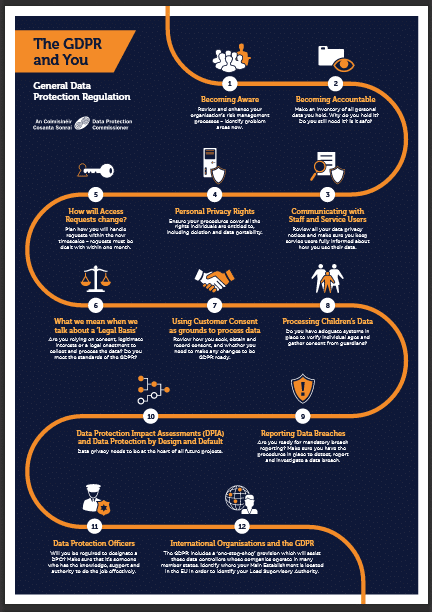
The 12 Essential Steps to Implementing the General Data Protection Act

1. Create awareness among your people of what is coming their way. The GDPR has given our regulator discretion to dish out fines up to ?20,000,000 (or 4% of total annual global turnover, whichever is greater) so there is determination to make this happen.

2. Become accountable by understanding the consumer data you hold. Why are you retaining it, how did you obtain it, and why did you originally collect it. Now you know it is there, how much longer will you still need it? How secure is it in your hands, have you ever shared it?

3. Open a communication channel with your staff, your customers, and anyone else using the data. Share how you feel about how accountable you have been with the information in the past. Explain how you plan to comply with the GDPR in future, and what needs to change.

4. Understand the personal privacy entitlement of the subjects of the information. They have rights to access it, correct mistakes, remove information, restrict its use, decline direct marketing, and copy it to their own files. What needs to change in your systems to assure these rights?

5. Issue a policy for allowing consumers access to their information you hold. You must process requests within a month, and you may not charge for the service unless your cost is excessive. You may decline unfounded or excessive demands within your policy guidelines.

6. Adapt to the requirement that you must have a legal basis for everything you do with, and to consumer data. You need to be in a position to justify your actions to the Irish Data Protection Commissioner in the event of a complaint. Having a legitimate interest is no longer sufficient.

7. Ensure that consumer consent to collect, use, and distribute their data is ?freely given, specific, informed, and unambiguous.? From 25 May 2018 onward, this consent will be your only ground to do so. You cannot force consent. Your benchmark becomes what the GDPR says.

8. Issue rules for managing data of underage subjects. This is currently under review and we are awaiting results. Put systems in place to verify age. Set triggers for where guardians must give consent. Make sure age is verifiable. Use language young people understand.

9. Introduce a culture of openness and honesty, whereby breaches of the GDPR are detected, reported, investigated, and resolved. You will have a duty to file a GDPR report with the Data Protection Commissioner within 72 hours, thus it is important to fast track the process.

10. Introduce a policy of conducting a privacy assessment before taking new initiatives. The GDPR calls for ?privacy by deign?, and we need to engineer it in. This may be the right time to appoint a data controller in your company, and start implementing the GDPR while you have time.

11. You may also need to appoint a data protection officer depending on the size of your business. Alternatively, you need to add managing data protection compliance to an employee?s duties, or appoint an external data-protection compliance consultant.

12. Finally, and you will be glad to know this is the end of the list, the GDPR has an international flavour in that multinational organisations will report into the EU Lead Supervisory Authority. This will manage the process centrally while consulting national data authorities.

The GDPR is a project we all need to complete. If we are out of line, it is in our interests to get things straightened out. Once everything is in place, the task should not be too onerous. Getting there could be the pain.

Contact Us

  • (+353)(0)1-443-3807 – IRL
  • (+44)(0)20-7193-9751 – UK

Check our similar posts

Monitoring Water Banks with Telemetrics

Longstanding droughts across South Australia are forcing farmers to rethink the moisture in the soil they once regarded as their inalienable right. Trend monitoring is an essential input to applying pesticides and fertilisers in balanced ratios. Soil moisture sensors are transmitting data to central points for onward processing on a cloud, and this is making a positive difference to agricultural output.

Peter Buss, co-founder of Sentek Technology calls ground moisture a water bank and manufactures ground sensors to interrogate it. His hometown of Adelaide is in one of the driest states in Australia. This makes monitoring soil water even more critical, if agriculture is to continue. Sentek has been helping farmers deliver optimum amounts of water since 1992.

The analogy of a water bank is interesting. Agriculturists must ?bank? water for less-than-rainy days instead of squeezing the last drop. They need a stream of online data and a safe place somewhere in the cloud to curate it. Sentek is in the lead in places as remote as Peru?s Atacamba desert and the mountains of Mongolia, where it supports sustainable floriculture, forestry, horticulture, pastures, row crops and viticulture through precise delivery of scarce water.

This relies on precision measurement using a variety of drill and drop probes with sensors fixed at 4? / 10cm increments along multiples of 12? / 30cm up to 4 times. These probe soil moisture, soil temperature and soil salinity, and are readily re-positioned to other locations as crops rotate.

Peter Buss is convinced that measurement is a means to the end and only the beginning. ?Too often, growers start watering when plants don’t really need it, wasting water, energy, and labour. By monitoring that need accurately, that water can be saved until later when the plant really needs it.? He goes on to add that the crop is the ultimate sensor, and that ?we should ask the plant what it needs?.

This takes the debate a stage further. Water wise farmers should plant water-wise crops, not try to close the stable door after the horse has bolted and dry years return. The South Australia government thinks the answer also lies in correct farm dam management. It wants farmers to build ones that allow sufficient water to bypass in order to sustain the natural environment too.

There is more to water management than squeezing the last drop. Soil moisture goes beyond measuring for profit. It is about farming sustainably using data from sensors to guide us. ecoVaro is ahead of the curve as we explore imaginative ways to exploit the data these provide for the common good of all.

Importance of Field Service Management Software for Mobile Working

Technology has been evolving at a fast pace. Changes are also happening simultaneously within different industries. Making a great difference in the business world right now is the trend of mobile working.

Thanks to platforms and tools, working while on the go is now easier and more streamlined. The field service industry also benefits from these technological advances.

Mobile technicians can now give excellent performance and do their job efficiently with no hands-on management needed.

Keep in mind that field service management is no joke. So, to achieve a smooth business and mobile worker management, you’ll need to invest in good mobile service management software.

But First, what is Mobile Working?

Mobile working is a method of working that is not tied to a single physical location.

It isn’t just about checking your emails on your phone or ringing your colleagues via Bluetooth while driving your car to the next appointment. It’s so much more intricate than that.

Effective mobile working means you’re mobilising your workers. Field technicians should have everything they need to complete their day to day work. You’re giving them their entire office in the form of a mobile device.

Mobile working, via a handheld device, allows field technicians to do the following:
● Access and input information about a work order
● Collaborate on projects
● Stay in touch with colleagues, clients and management
● Utilize effectively the different software features

Your field workers should have the support of a dynamic management tool that ensures they are sent to the job that utilises their skills effectively and efficiently.

That’s where a good field service management software shows its importance.

The Role of a Field Service Management Software

Your mobile workforce is scattered across various physical locations. You’ll need to connect with them and simultaneously manage your field service business.

Thanks to the increasing connectivity and improvement of technologies for this purpose, mobile workers can easily input and access any work order details via your chosen field service management software.

What Makes a Good Field Service Management Software?

There are 3 main points to consider when investing in a good mobile workforce management software:

1. It’s simple and familiar to use. Like we mentioned before, be sure to mobilise your field technicians – not the back-office system. Make sure your chosen app or software has a simple user interface so your workers can be on-the-go easily.

2. It works offline. Rural areas and highways can have poor connectivity. Sometimes agents will need to work in areas that have little to no network coverage or are deep down working in tunnels or around heavy machines and turbines. You don’t want your field technicians unable to complete work due to connectivity issues. Make sure to choose software that can function on their device while offline.

3. It’s flexible (and maintainable). Your field service management of choice should have real-time visibility. Flexible and improved visibility for a field worker means that they can do their best in any task. They can share or get critical information about orders and customers. This drastically improves job completion rates and customer satisfaction.

Importance of Field Service Management Software to Mobile Working

Utilize the technology that is available to you. Your mobile workforce should have the right tools so they can make sure to do their fieldwork efficiently without worrying about tedious administrative work. Any back-office task can be done quickly through a field service management software.

And that’s the most important role of a great mobile service management app — effective mobile worker efficiency.

Benefits of a Field Service Management Software to Mobile Working

● Additional revenue: By simplifying the administrative work, your field technician can even double the work order in their daily shift, meaning more profit for the business.

● Cost-cutting: The cloud-based nature of a field service management software means that your business can reduce the cost of on-site IT.
Your mobile workforce can operate from wherever they have an online connection, meaning less reliance on offices and building costs.

● Boosts overall efficiency: A mobile workforce management software allows you as a manager to monitor in real-time where they are and what they are doing. It means that problems can be identified and dealt with immediately.
Your field technician, in turn, becomes more efficient because the technology allows them a quicker response, instead of taking too long finishing administrative tasks.

Invest in a great field service management software. Check out FieldElite and see how they can help you with the following mobile working features:
• Accepts jobs in the field
• Automate appointment scheduling
• Manage scheduled jobs
• Get real-time visibility into all operations
• Have a clear and easy viewing of job locations
• Resolve field service calls faster
• Enable mobile workers to get the job done right
• Keep customers updated at every step
• Create quotations and accept payments
• Analyse efficient reports from field technicians

Solutions to Password Overload

If only technologists had their way, passwords and PINs would have long been replaced with more innovative (and admittedly, better) security solutions. But such is not the case. Those alternative solutions, which include biometrics, smart cards, and password fobs, effective as they may be, are just way too expensive to implement.

So although passwords and PINs may not be here to stay, they certainly won’t be going away soon either.

Why keeping passwords in memory is no longer possible

A couple of decades ago, it would have been nearly impossible to crack an eight-character password using brute force. Today, however, advancements in computing power are rendering the typical passwords of the past easily decipherable, forcing us to come up with passwords that are not only much longer, but also much more complex and hence difficult to recall.

For instance, memorable words like your favourite character (e.g. ‘skywalker’) may have been acceptable then, but not anymore. Today?s security systems will encourage you to insert numbers or even other keyboard characters as a means to once again counter brute force. Hence, ‘sk5%ywa936lker@#’ may be more acceptable.

Remembering that one alone can be pretty daunting.

To further complicate matters, the number of applications that require passwords for access is much greater than before even for a single end user. Ordinary end users have to keep track of passwords for their email account, network login, workstation login, online services, and so on.

The burden is even greater for your IT admins, who have to remember a larger collection of passwords that protect business critical systems and applications. Clearly, the team in charge of your IT security will need a way to manage all these passwords.

Password management solutions

Existing password management solutions typically come in the form of software applications that store passwords. Basically, all you need to remember are your login details for the app a.k.a. the ?master password?. Once you’ve gained access inside, you can then retrieve any password you stored there.

Some of these apps are installed in portable devices like Pocket PCs, PDAs, or smartphones, which you would normally take along with you. For as long as the device stays with you, your passwords will be in safe hands. What’s more, you can retrieve them anywhere you go.

But obviously, there’s a problem. What if the device gets misplaced or stolen? Although the person who ends up with your device may not be able to gain access into the app and your passwords, neither will you. A better solution would therefore be an app that can be accessed anywhere but is not susceptible to getting lost.

Web-based password manager

A web-based password manager fits the bill. You don’t have to take it with you, but still you can access it almost anywhere. A typical web-based password manager will have all your passwords stored in a centralised, highly secure location.

If you want, you can even use your mobile password manager along with the web-based one. Ideally, your web-based password manager would have a copy of all the end-user passwords as well as the master passwords of your organisation.

With an easy to access but highly-secure web-based password manager, you no longer have to come up with passwords that (ironically) are supposed to be easy to remember but hard to crack at the the same time.

Furthermore, password managers are ideal for keeping passwords that have to be changed every-now-and-then; a requirement that’s becoming all too common in organisations bent on enforcing more stringent controls.

Ready to work with Denizon?